Avast Review: Ultimate Protection or Overhyped Software?

Looking for a reliable antivirus to protect your devices? You’ve probably heard about Avast, but is it really the right choice for your security needs?
In this Avast review, you’ll get a clear picture of what the software offers, how well it defends against threats, and whether it fits your budget and lifestyle. Whether you’re considering the free version or thinking about upgrading, this guide will help you understand Avast’s strengths and weaknesses.
Keep reading to discover if Avast can truly keep your devices safe without slowing you down or causing frustration.

Credit: www.macworld.com
Avast Features
Avast offers a wide range of features designed to protect your devices from online threats. Its tools work quietly in the background to keep your data safe. These features combine strong security with user-friendly controls. Below, we explore some of the key features Avast provides.
Real-time Threat Detection
Avast continuously scans your device for malware and viruses. It blocks threats before they cause harm. This feature updates automatically to recognize new dangers. It helps keep your system safe during daily use. Real-time detection is essential for preventing infections early.
Wi-fi Security Scanning
Avast checks your Wi-Fi network for vulnerabilities. It alerts you if your connection is not secure. This protects against hackers trying to access your data. The tool also detects weak passwords and unsafe settings. Secure Wi-Fi is critical for safe internet browsing.
Customization Options
Avast allows you to tailor its settings to your needs. You can schedule scans or adjust sensitivity levels. This flexibility lets you control how the software works. Users can enable or disable specific features easily. Customization ensures Avast fits your daily routine.
Ai-powered Avast Assistant
The Avast Assistant uses artificial intelligence to spot threats. It scans emails, links, and files for suspicious content. This tool offers advice on potential risks in real time. It helps users make safer choices online. AI support adds an extra layer of protection.
Free Vs Paid Versions
Avast offers both free and paid antivirus options. Each version provides important security features to protect your devices. Understanding the differences helps you choose the right protection level. The free version covers basic needs, while the paid plans add advanced tools for stronger security.
Deciding between free and paid depends on your security needs and budget. Here is a clear breakdown of what each version offers.
Free Tier Benefits
The free version of Avast provides essential virus protection. It scans for malware and blocks harmful websites in real time. It also includes Wi-Fi security scanning to check your network safety. Users get access to a simple, easy-to-use interface. This tier is good for basic device protection without any cost.
Limitations Of Free Version
The free version lacks advanced security features. It does not include ransomware protection or webcam shielding. You will see frequent pop-ups asking you to upgrade. Privacy tools and secure browsing features are limited. Customer support is basic and slower compared to paid plans.
Paid Plan Features
Paid Avast plans add layers of protection beyond the basics. They include firewall control and ransomware shield. Users get secure banking and shopping protection. The paid version offers webcam protection and data shredder tools. Priority customer support and fewer ads improve the experience. Some plans also include a VPN for online privacy.
Cost Breakdown
Avast’s paid plans vary by features and devices covered. The basic paid plan starts around $70 per year. More advanced plans with VPN and extra privacy tools cost up to $120 yearly. You can protect multiple devices with family or premium bundles. Monthly payment options are available but usually cost more.
Performance And Protection
Avast balances security and speed to protect your device without slowing it down. Its performance and protection features aim to block threats effectively while keeping your system responsive. This section reviews Avast’s malware detection rates and its impact on system performance. It also compares Avast with Windows Defender and Norton to help you understand its standing in the antivirus market.
Malware Detection Rates
Avast consistently scores high in independent malware detection tests. It identifies and blocks a wide range of threats, including viruses, ransomware, and spyware. Testing labs like AV-TEST show Avast’s detection rate to be above 99%. This level of protection helps keep your data safe from new and emerging risks. Avast’s real-time scanning updates regularly to catch the latest threats fast.
Impact On System Performance
Avast has a low impact on system speed during scans and daily use. It runs quietly in the background without causing noticeable slowdowns. Quick scans take only minutes and full scans complete efficiently. The software uses minimal memory and CPU, allowing users to work or play without lag. This makes Avast suitable for both older and newer computers.
Comparison With Windows Defender
Windows Defender offers basic protection built into Windows 10 and 11. Avast provides more advanced features like Wi-Fi security and a password manager. Malware detection rates for Avast tend to be higher than Windows Defender in many tests. Avast also offers more frequent updates and better phishing protection. Windows Defender, however, runs more silently with almost zero system impact.
Comparison With Norton
Norton is known for strong malware detection and comprehensive security tools. Avast matches Norton closely in malware blocking but offers a more user-friendly interface. Norton’s system impact can be heavier than Avast’s during scans. Norton includes extra features like VPN and cloud backup in premium plans. Avast’s free version gives good protection, while Norton focuses more on paid subscriptions.
User Experience
User experience plays a vital role in choosing antivirus software. Avast’s design and support influence how users interact with the program daily. Clear navigation, helpful assistance, and minimal interruptions improve satisfaction. Below, we analyze key aspects of Avast’s user experience.
Interface And Usability
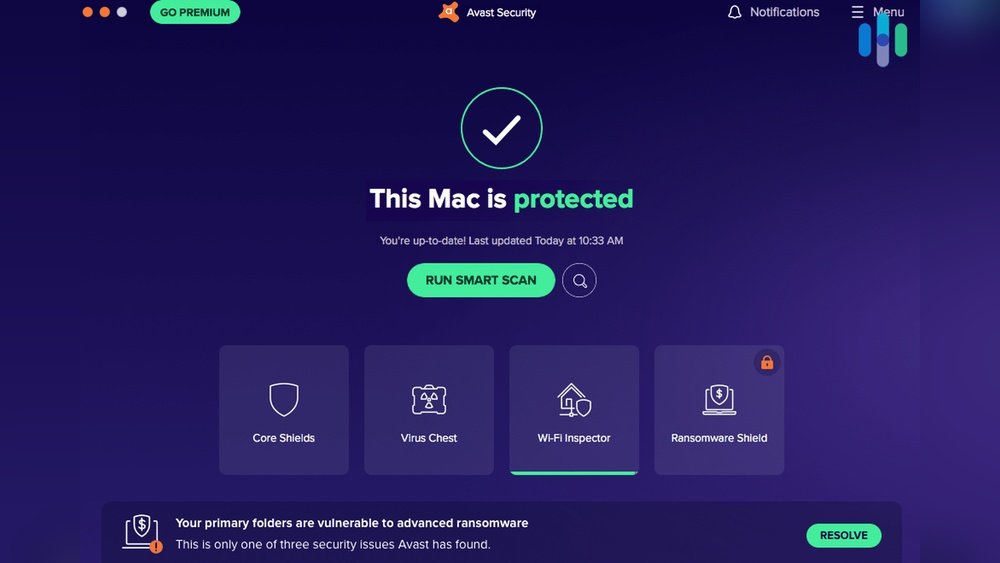
Avast features a clean and simple interface. Icons and menus are well-organized for easy access. New users can find essential tools without confusion. The dashboard shows real-time protection status clearly. Customization options are available but do not overwhelm. Overall, the program balances power with user-friendliness effectively.
Upselling Pop-ups
One common complaint involves frequent upselling pop-ups. Avast often prompts users to upgrade to premium plans. These pop-ups appear during scans or when opening the app. They can disrupt the user’s flow and feel intrusive. Users on the free version report this as a significant annoyance. Avast could improve by reducing the frequency of these alerts.
Customer Support Quality
Avast provides multiple support channels, including live chat and email. Response times vary, sometimes taking hours for detailed issues. The knowledge base is extensive with guides and FAQs. Some users find solutions quickly, while others struggle with complex problems. Support quality remains average but helpful for common concerns.
User Reviews And Ratings
User reviews show mixed opinions about Avast. Many praise its strong malware detection and easy interface. Others highlight privacy worries and upsell tactics. Ratings on popular platforms range from moderate to high. The free version appeals to casual users, while advanced users seek more control. Overall, Avast receives fair feedback for performance and usability.
Privacy And Security Concerns
Privacy and security concerns are important when choosing antivirus software. Avast has faced scrutiny over its data handling in the past. Users want to know if their information stays safe and private. This section looks closely at Avast’s privacy history and current protections.
Past Data Privacy Issues
Avast faced criticism for collecting user data through its browser extension. Reports revealed it sold browsing data to third parties. This raised alarms about user privacy and trust. Avast later stopped this practice and promised better data handling. The incident affected its reputation globally.
Current Privacy Measures
Avast now uses stronger privacy controls to protect user data. It has a clear privacy policy explaining data collection limits. Avast offers options to opt out of data sharing for advertising. The company encrypts sensitive information to prevent breaches. Regular updates improve security features and patch vulnerabilities.
Trustworthiness Of Avast
Avast works with independent labs to verify its security claims. Many users still trust Avast for malware protection despite past issues. Transparency efforts help rebuild user confidence over time. Avast continues to invest in privacy and security improvements. Users should review settings to control data sharing fully.
Alternatives To Avast
Avast is a popular choice for antivirus protection, but it may not fit everyone’s needs. Some users want simpler tools, fewer ads, or stronger privacy features. Others need software that works better on specific devices. This section explores good alternatives to Avast for different situations.
Other Top Antivirus Options
Many antivirus programs offer strong security and extra features. Norton provides excellent malware detection and customer support. Bitdefender has a low impact on system speed and solid real-time protection. Kaspersky delivers strong anti-phishing tools and easy controls. These options suit users who want reliable defense without constant pop-ups.
When To Choose Windows Defender
Windows Defender comes built into Windows 10 and 11. It offers basic protection that is good enough for many people. It updates automatically and runs quietly in the background. Users who prefer a free, no-fuss antivirus might find Windows Defender enough. It also avoids the ads and upselling that some third-party apps show.
Best Antivirus For Different Devices
Different devices need different antivirus tools. For Windows PCs, Norton or Bitdefender works well. Mac users benefit from Intego or Avast’s Mac version, which focus on Mac-specific threats. Android devices need apps like McAfee or AVG, which scan apps and protect against theft. iOS users should use built-in protections and apps like Lookout for extra safety.
Pros And Cons
Assessing the pros and cons of Avast antivirus helps you decide if it suits your needs. This balance shows what the software does well and where it falls short. Understanding these points guides a smarter choice for your device security.
Advantages Of Avast Antivirus
Avast provides strong real-time malware protection for free. It scans threats quickly and accurately. The user interface is simple and clear, making it easy for beginners. Avast also offers Wi-Fi security scanning to detect unsafe networks. Customization options allow users to adjust settings to fit their preferences. The software runs lightly, reducing impact on system speed. It supports multiple operating systems, including Windows, Mac, Android, and iOS.
Drawbacks To Consider
Avast’s free version lacks some essential protections found in paid plans. Users often report frequent pop-up notifications pushing upgrades. Past privacy concerns have affected user trust. Some features can overwhelm new users with options. Occasionally, the software may slow down older devices. Customer support can be slow or limited in the free tier. These factors may affect your overall experience with Avast.
Credit: www.dealarious.com

Credit: www.security.org
Conclusion
Avast offers solid protection with easy-to-use features. The free version provides basic security but lacks some important tools. Users appreciate its real-time malware detection and clean interface. Some find the frequent upgrade prompts annoying. Past privacy issues may concern cautious users.
Overall, Avast works well for everyday protection. Consider your needs before choosing between free or paid plans. For many, Windows Defender might be enough. Exploring options helps find the best antivirus for you.