Best Apps for Running Windows on Mac: Top Picks for 2026

If you’re a Mac user who needs to run Windows applications, you know it can be tricky to find the right solution. You want something that works smoothly, without slowing down your Mac or causing headaches.
Whether it’s for work, gaming, or just accessing a specific Windows-only program, having the best app for running Windows on your Mac can make all the difference. You’ll discover top options that fit different needs and budgets—helping you get the most out of both worlds.
Keep reading to find the perfect app that lets you switch between Mac and Windows with ease.

Credit: www.playonmac.com
Virtual Machines For Mac
Windows emulators let Mac users run Windows programs without installing Windows itself. They create a virtual environment that mimics Windows on your Mac. This allows apps and games made for Windows to work smoothly. Emulators use less space and often cost less than full virtual machines. They are great for users who need occasional access to Windows-only software. Here are some popular Windows emulators for Mac.
Codeweavers Crossover Capabilities
Codeweavers CrossOver runs many Windows apps directly on Mac. It does not require a Windows license. CrossOver uses Wine technology to translate Windows commands. This makes it lighter and faster than full virtual machines. It supports office tools, utilities, and some games. CrossOver offers easy installation and good compatibility. It also provides technical support for users. It suits those who want simple Windows app access.
Playonmac For Gaming
PlayOnMac focuses on running Windows games on Mac. It uses Wine but adds a user-friendly interface. The software helps install and manage Windows games easily. It supports many popular titles without needing Windows. PlayOnMac is free and open-source. It offers updates to improve game performance. This makes it a favorite among casual gamers. It is also simple to set up and use.
Whisky For Windows Games
Whisky targets Windows games on Mac with better speed. It is a Wine-based emulator optimized for gaming. Whisky supports DirectX and other gaming libraries. It provides a smooth experience for many Windows games. The app is lightweight and easy to configure. Users can customize settings for each game. Whisky is ideal for gamers wanting good performance without Windows. It works well for both old and new titles.

Credit: machow2.com
Windows Emulators
Boot Camp and native installation offer a direct way to run Windows on a Mac. This method lets you install Windows alongside macOS on your Mac’s hard drive. You can boot into either system when starting your computer. This setup provides full access to Windows without the need for extra software layers. It is ideal for users who need native Windows performance. However, it works only on Intel-based Macs, not on newer Apple Silicon models.
Setting Up Boot Camp
Boot Camp Assistant is a built-in Mac utility that helps with Windows installation. It guides you through creating a Windows partition on your disk. You must have a valid Windows ISO file to proceed. The assistant also downloads necessary drivers for Windows to run smoothly on Mac hardware. After partitioning, your Mac will restart and begin Windows installation. Follow the on-screen instructions to complete the setup. Once done, you can switch between macOS and Windows by holding the Option key at startup.
Intel Vs Apple Silicon Macs
Boot Camp supports only Intel Macs. It cannot run on Macs with Apple Silicon chips like M1 or M2. Apple Silicon uses a different architecture that Windows does not natively support. For these Macs, virtualization software or emulators are the only options. Intel Macs can run Windows natively with full driver support. Apple Silicon Macs rely on apps like Parallels to run Windows in a virtual machine. Knowing your Mac’s processor type is key to choosing the right method.
Performance Considerations
Boot Camp offers the best Windows performance on Intel Macs. Running Windows natively means no speed loss from virtualization. You get full access to Mac hardware and graphics power. This setup is ideal for gaming and heavy software use. Switching between macOS and Windows requires a restart. Virtual machines offer convenience but may reduce performance. Apple Silicon Macs running Windows via emulation face performance limits. Native installation remains the fastest way to run Windows on Intel Macs.
Boot Camp And Native Installation
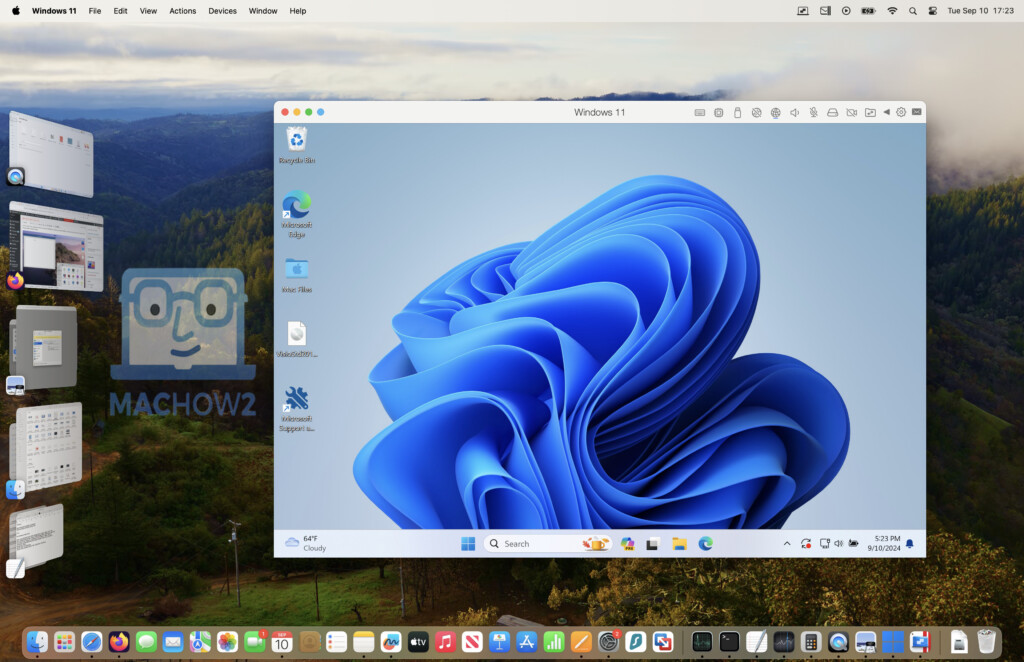
Remote desktop solutions let Mac users access Windows computers from a distance. This method avoids installing Windows directly on the Mac. It uses the internet or a local network to connect to a Windows PC or server. Remote desktop apps provide a smooth and simple way to run Windows programs on Mac. They are useful for users who need Windows apps occasionally or want to use a powerful Windows machine remotely.
Chrome Remote Desktop
Chrome Remote Desktop is a free tool by Google. It works through the Chrome browser on both Mac and Windows. Setup is quick and easy. Users install the app on both computers and sign in with a Google account. The connection is secure and stable. It supports keyboard and mouse input from the Mac. It is ideal for basic Windows tasks and light software use.
Microsoft Remote Desktop
Microsoft Remote Desktop is designed to connect Macs to Windows PCs. It supports Windows Professional and Enterprise editions. The app offers a reliable and fast connection. It lets users access files, apps, and networks on a Windows machine. The interface is clean and simple to navigate. It handles high-quality graphics and sound well. Perfect for work environments and heavy Windows usage.
Other Remote Access Apps
Several other remote desktop apps work well for running Windows on Mac. TeamViewer offers easy setup and cross-platform support. AnyDesk provides fast performance and low latency. Splashtop is known for smooth video and audio streaming. These apps vary in pricing and features. Users can choose based on their needs for speed, security, and ease of use.
Credit: machow2.com
Remote Desktop Solutions
Choosing the right app to run Windows on your Mac is essential for a smooth experience. Each app offers different features, costs, and levels of ease. Consider what matters most to you before deciding. This guide will help you weigh key factors for the best choice.
Performance Vs Cost
Performance is critical when running Windows apps on a Mac. Some apps offer fast speeds and strong graphics support. These usually come with a higher price. Cheaper or free options may run slower or lack features. Balance what you need with what you can spend. Think about how often you will use Windows on your Mac.
Ease Of Use
Simple setup and smooth operation save time and frustration. Look for apps with clear instructions and intuitive interfaces. Some apps automatically optimize settings for your Mac. Others require more manual tweaks. If you want to start quickly, pick an app that is easy to use. This helps especially if you are not tech-savvy.
Support And Updates
Good support means help is available when problems occur. Check if the app offers customer service or online resources. Regular updates keep the app secure and compatible with new Mac systems. Apps with frequent updates often fix bugs and improve performance. Choose software that stays current and supports your device well.
Conclusion
Choosing the right app makes running Windows on Mac easy and smooth. Each option offers unique features to fit your needs. Some apps focus on gaming, while others support everyday tasks. Performance and price vary, so consider what matters most.
With these tools, your Mac can handle Windows programs without trouble. Try a few apps to see which works best for you. Running Windows on a Mac has never been simpler or more accessible.