Soundpaint Review: Ultimate Guide to Powerful Music Creation

If you’re searching for a virtual instrument that combines speed, sound quality, and flexibility, Soundpaint might just catch your attention. Imagine loading richly detailed instruments in seconds and smoothly blending sounds to create something entirely new—all without breaking your budget.
Whether you’re composing cinematic scores or producing electronic music, Soundpaint offers a fresh approach to sample playback that could change how you work. In this review, you’ll discover what makes Soundpaint stand out, where it falls short, and how it compares to other popular tools like Native Instruments Kontakt.
Ready to find out if Soundpaint is the right fit for your music? Let’s dive in.

Credit: auditory1.com
Soundpaint Basics
Understanding the basics of Soundpaint helps you get started with this virtual instrument. It offers a fresh approach to sample playback. Soundpaint focuses on realism and easy manipulation of sounds. The technology behind it allows for smooth blending of samples in real time. This section breaks down what Soundpaint is, its main features, and where you can use it.
What Is Soundpaint
Soundpaint is a virtual instrument engine created by Troels Folmann. It plays samples with high realism and detail. Unlike typical samplers, it uses advanced morphing technology. This technology lets you blend different sounds seamlessly. Soundpaint aims to provide a natural playing experience. It supports various sample libraries, including free and commercial ones. Users praise its fast loading times and sound quality.
Core Features
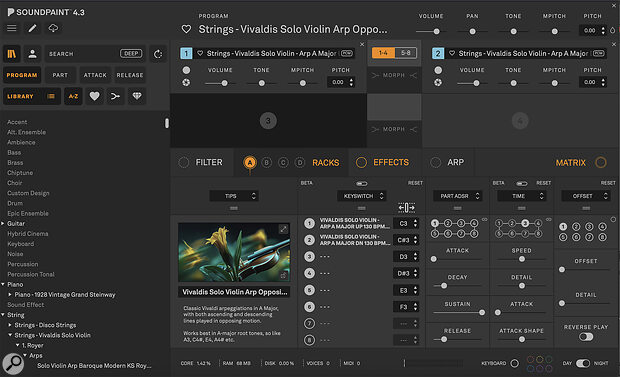
The core of Soundpaint lies in its morphing engine. This engine mixes multiple samples fluidly as you play. It also includes built-in effects like reverb and delay. The interface is simple, focusing on sound rather than complex controls. Instruments load quickly from SSDs, reducing wait times. Soundpaint supports modular racks for custom sound design. It also handles deep sampling with dynamic expression.
Supported Platforms
Soundpaint works on both Windows and macOS. It supports popular DAWs through VST and AU plugins. This makes it easy to integrate into your music setup. The software is optimized to run smoothly on modern computers. It requires a decent amount of RAM for best performance. The free version is available for testing before purchase. Soundpaint’s compatibility covers most home and professional studios.
Performance Highlights
Soundpaint delivers a smooth and efficient performance that impresses users. It handles complex audio tasks without delays or glitches. The software’s design focuses on speed and flexibility. These qualities make it suitable for both beginners and pros.
Here are the main performance highlights that stand out in Soundpaint.
Fast Loading Times
Soundpaint loads instruments quickly, saving valuable time. It uses optimized data handling to reduce wait times. Even large sample libraries open almost instantly from SSDs. This speed helps keep creative flow uninterrupted during sessions.
Real-time Sample Morphing
The real-time morphing feature blends sounds smoothly. It allows users to mix multiple samples into new tones. This process happens live, without latency or stutter. The result is dynamic soundscapes that evolve naturally as you play.
Built-in Effects
Soundpaint includes a range of built-in effects for sound shaping. Users can apply reverb, delay, and modulation directly inside the engine. Effects are processed efficiently, maintaining high audio quality. This built-in toolkit reduces the need for extra plugins.
User Interface
The library and instruments section defines the core of Soundpaint’s appeal. It offers a variety of sounds that suit many music styles. Users enjoy its flexibility and depth. The instruments are sampled with care to capture natural tones and expression. This section explores what the library contains and how it can grow.
Free Libraries Available
Soundpaint provides several free libraries for users to start with. These include basic instruments like pianos, strings, and drums. The free packs are easy to download and install. They give a solid foundation to test Soundpaint’s sound engine. Users can create music right away without extra cost.
Popular Instrument Packs
Many users prefer popular instrument packs for their quality and versatility. Packs like Disco Guitars and Solo Strings stand out for their detailed samples. These packs cover genres from funk to classical. They bring realistic sounds and expressive playability. Popular packs keep users coming back for more options.
Expanding Micro-libraries
Soundpaint supports micro-libraries that expand its sound palette. These small, focused packs target specific instruments or styles. Users can add them over time to customize their setup. Micro-libraries are easy to manage and often affordable. They help keep the library fresh and diverse.
Credit: www.soundonsound.com
Library And Instruments
Soundpaint offers versatile uses across many music production fields. Its unique sample morphing and fast loading make it suitable for different creative needs. Here are some common use cases where Soundpaint stands out.
Cinematic Scoring
Soundpaint delivers rich, realistic instrument sounds for film and TV scores. Composers can blend multiple samples smoothly to create dynamic moods. It works well for orchestral parts, strings, and ambient textures. Fast loading means quick workflow during tight deadlines. Its built-in effects help add depth without extra plugins.
Electronic Music Production
Producers use Soundpaint to add organic sounds to electronic tracks. Morphing between samples creates evolving textures and pads. It supports layering instruments for unique sound design. The sample quality helps maintain clarity in mixes. Soundpaint’s low CPU usage allows more tracks in sessions.
Live Performance
Musicians use Soundpaint live due to its low latency and fast response. It handles complex sample sets without lag. Performers can morph sounds on the fly for expressive play. Its modular rack setup fits well with live rigs. Reliable performance makes it a solid choice for stage use.

Credit: www.youtube.com
Conclusion
Soundpaint offers a unique approach to virtual instruments. It loads samples quickly and allows smooth morphing between sounds. The interface is simple but may feel limited to some users. Its free access makes it a good choice for beginners or budget-conscious producers.
While it lacks deep editing controls, it shines in real-time performance. Try Soundpaint to explore its capabilities and see how it fits your music style. Overall, it provides solid sound quality and creative options for various projects.