Krisp Review: Ultimate Noise-Canceling App for Clear Calls

If you’ve ever struggled with noisy calls or distracting background sounds during your online meetings, Krisp might just be the solution you’re looking for. This powerful app promises to block out unwanted noise and even help you capture clear meeting notes without any hassle.
But does it really live up to the hype? In this Krisp review, you’ll discover how well it works, what makes it stand out, and whether it fits your needs—whether you’re juggling Zoom, Google Meet, or Microsoft Teams. Keep reading to find out if Krisp can make your calls smoother and your workflow easier.
Krisp Ai Technology
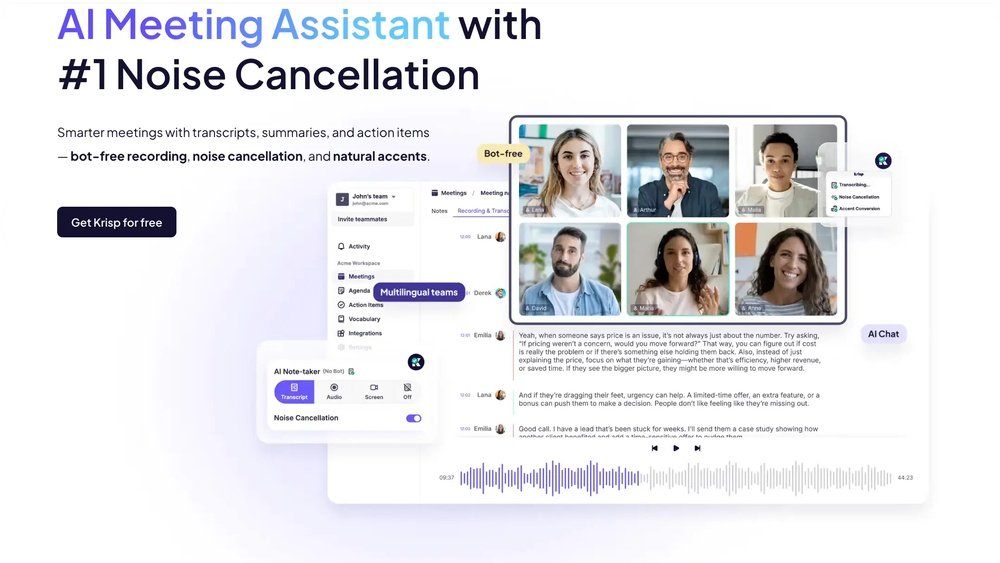
Krisp AI Technology powers advanced noise cancellation and transcription tools. It uses smart algorithms to separate voices from background sounds. This makes calls and recordings clearer. The technology runs locally on your device. It does not send your audio to the cloud, keeping conversations private.
Krisp adapts to different environments. Whether in a busy office or a noisy cafe, it works smoothly. Users enjoy clearer calls without distractions. The AI learns to recognize human speech and filter out unwanted noise.
How Krisp Cancels Noise
Krisp uses deep neural networks to detect noise patterns. It identifies sounds like keyboard clicks, dog barks, and traffic. The AI removes these noises in real-time during calls. This happens without delay or echo.
The technology works both ways. It cancels noise from your microphone and from other participants’ microphones. This creates a quiet and focused conversation environment. Users report better communication and less need to repeat themselves.
Ai Transcription Features
Krisp offers AI-powered transcription that converts speech to text. The system captures spoken words accurately during meetings. It supports multiple languages and accents for global users.
The transcription runs quietly in the background. It creates meeting notes without disrupting the call. Users can review the text later to catch important details. This feature saves time and improves productivity.
Call Quality Performance
Call quality performance is a crucial factor for any communication tool. Krisp aims to enhance every call by reducing noise and improving clarity. This section examines how well Krisp handles noise cancellation, background sounds, and transcription accuracy during calls.
Noise Cancellation Tests
Krisp uses artificial intelligence to filter out unwanted sounds. During tests, it successfully muted common noises like keyboard clicks and dog barking. The voice remained clear and natural. The noise reduction did not create robotic or distorted audio. This makes conversations more comfortable and less distracting.
Handling Background Sounds
Krisp adapts to different environments to manage background sounds effectively. Whether in a busy cafe or a noisy home, it reduces ambient noise well. Sounds like lawnmowers and chatter are softened without affecting the speaker’s voice. This feature helps users stay focused during calls, even in loud places.
Transcription Accuracy
Krisp also offers AI-powered transcription during calls. It captures spoken words clearly and turns them into text. Accuracy is high with standard accents and low background noise. However, heavy noise or strong accents may lower transcription quality. Still, Krisp provides helpful summaries without using distracting bots.
App Compatibility
Krisp works well with many popular communication apps. It fits easily into your daily video calls and meetings. The app acts as a virtual microphone and speaker, cleaning audio on both ends. This makes it a handy tool across different software.
Users enjoy Krisp because it does not limit you to one platform. It supports a wide range of meeting tools, making it versatile for work or personal use. This broad compatibility ensures you can use Krisp in almost any online conversation.
Supported Meeting Platforms
Krisp supports top video conferencing apps. Zoom, Google Meet, Microsoft Teams, and Skype are all covered. It also works with Discord, Slack, and Cisco Webex. This wide support means Krisp fits into many work and social setups.
The app integrates as a virtual microphone and speaker. It filters noise before the sound reaches your call. This helps keep calls clear, no matter which platform you use. Krisp also works with less common apps that use your microphone.
Cross-platform Functionality
Krisp runs on Windows, macOS, iOS, and Android devices. You can use it on your laptop, desktop, or phone. This makes Krisp a flexible choice for users who switch devices often.
The app syncs settings across devices with one account. This saves time and keeps your preferences consistent. Krisp uses little CPU power, so it works smoothly on many devices.
Thanks to this cross-platform support, Krisp fits into many workflows. It helps maintain clear audio whether you are at home, in the office, or on the go.

Credit: www.laxis.com
Pricing And Plans
Understanding Krisp’s pricing and plans helps you decide if it fits your needs. The service offers options for casual users and professionals. Each plan has unique features designed to suit different usage levels and budgets.
Free Tier Features
The free plan lets you cancel noise for up to 120 minutes per week. It supports one device and one microphone and speaker each. You get access to Krisp’s AI noise cancellation for calls and recordings. This tier suits users who have light or occasional use.
Paid Plans Overview
Krisp offers two main paid plans: Pro and Business. The Pro plan includes unlimited noise cancellation minutes. It supports multiple devices and higher audio quality. The Business plan adds team management tools and priority support. Pricing is monthly or yearly, with discounts for annual payments.
Value For Money
The free plan is great to test Krisp’s technology. The Pro plan is affordable for frequent users needing clear calls. Business users get added features that help manage groups easily. Krisp balances price with powerful AI features well. It suits individuals and teams wanting a quieter audio experience.
User Experience
The user experience of Krisp plays a crucial role in its popularity. The app aims to make noise cancellation simple and effective for all users. It combines powerful features with a design that suits both beginners and professionals. Users often find Krisp easy to navigate and helpful during calls or recordings.
Interface And Ease Of Use
Krisp has a clean and clear interface. The main functions are easy to find and activate. Users can turn noise cancellation on or off with a single click. The setup process is quick, requiring only a few steps. The app works smoothly with popular meeting tools like Zoom and Microsoft Teams. This makes it convenient for daily use.
Resource Usage
Krisp runs quietly in the background. It uses a moderate amount of CPU and memory. Some older or low-powered devices may feel a slight slowdown. Most modern computers handle Krisp without problems. The developers continue optimizing the app to reduce resource needs. Users appreciate that it does not drain battery excessively during long calls.
Customer Feedback
Many users praise Krisp for its noise-canceling quality. They report clearer calls and fewer distractions. Some reviews mention occasional drops in transcription accuracy. Users with heavy accents or loud backgrounds notice this more. The support team responds quickly to questions and issues. Overall, customers find Krisp reliable and easy to use daily.

Credit: www.youtube.com
Krisp Vs Competitors
Comparing Krisp to its competitors helps highlight its unique features and performance. Many users want to know how Krisp stacks up against other noise-cancelling apps. This section focuses on Krisp and NVIDIA Broadcast, two popular choices for audio enhancement.
Comparison With Nvidia Broadcast
Krisp works on both Mac and Windows devices. NVIDIA Broadcast only works on Windows with RTX GPUs. Krisp removes background noise from both your microphone and speakers. NVIDIA Broadcast also enhances video with effects like background blur.
Krisp uses cloud-based AI to filter noise in real-time. NVIDIA Broadcast processes noise locally using your computer’s GPU. Krisp supports many meeting apps like Zoom and Teams. NVIDIA Broadcast integrates deeply with streaming software like OBS.
Krisp offers a free plan with limited minutes. NVIDIA Broadcast is completely free but requires specific hardware. Krisp’s interface is simple and user-friendly. NVIDIA Broadcast has more settings but needs some tech knowledge.
Strengths And Weaknesses
Krisp’s strength lies in its wide compatibility and easy setup. It works well on laptops without special hardware. Krisp cancels noise effectively for both speakers and listeners. It also offers AI transcription and meeting summaries.
Krisp uses more system memory, which may slow down some computers. Transcription accuracy can drop with heavy accents or noisy environments. The free version limits monthly usage time.
NVIDIA Broadcast excels in video features and local processing speed. It offers strong noise removal for users with RTX cards. It is free but limited to newer NVIDIA GPUs. NVIDIA Broadcast lacks cross-platform support and transcription features.
Use Cases
Krisp offers practical solutions for various audio challenges. It works well in many settings. Below are key use cases that show how Krisp improves sound quality.
Remote Work And Meetings
Krisp removes background noise during online meetings. It blocks sounds like typing, pets, and street noise. This helps participants hear each other clearly. It supports apps like Zoom, Microsoft Teams, and Google Meet. Remote workers stay focused and professional with Krisp.
Online Teaching And Webinars
Teachers and presenters use Krisp to keep audio clear. It filters out distractions from classrooms or home environments. Students listen without interruption. Krisp makes webinars more engaging and easier to follow. Clear sound helps deliver lessons effectively.
Podcasting And Content Creation
Podcasters use Krisp to improve recording quality. It removes background sounds like fans, traffic, or echo. Content creators produce clean audio without extra equipment. Krisp works with popular recording software. It saves time on editing and improves listener experience.
Credit: www.youtube.com
Conclusion
Krisp offers clear noise cancellation for many common distractions. It works well with popular meeting apps like Zoom and Teams. The AI transcription feature helps keep meeting notes without extra effort. Some users report it can use a lot of memory on laptops.
Accuracy may drop with loud backgrounds or strong accents. Overall, Krisp suits those needing quieter calls and simple note-taking. Choose the plan that best fits your needs and devices. Try it yourself to see if it improves your meetings.