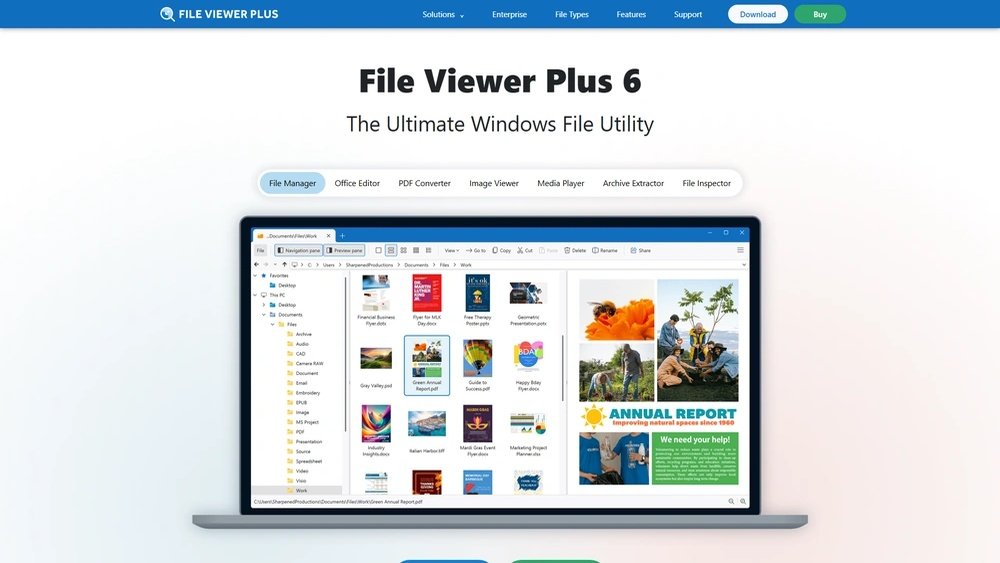
File Viewer Plus Review: Ultimate Guide to Features & Benefits

If you’ve ever struggled to open a file because your usual software just won’t do the job, you’re not alone. You want a simple, reliable tool that handles almost any file type without hassle.
That’s exactly where File Viewer Plus comes in. This program promises to be your all-in-one solution, letting you view, edit, and even convert files without jumping between different apps. But does it live up to the hype? In this review, you’ll discover how File Viewer Plus can make your digital life easier, whether you work with documents, images, spreadsheets, or more.
Keep reading to find out if this tool is the game-changer you’ve been searching for.
Credit: fileviewerplus.com
Key Features
File Viewer Plus offers a range of features that make it a versatile tool for viewing and managing files. Its functionality covers many file types and editing needs. These key features enhance user experience and productivity.
Wide File Format Support
File Viewer Plus can open over 300 file formats. This includes documents, images, audio, and video files. Users do not need multiple apps for different files. It supports common formats like PDF, DOCX, JPG, and MP4. This wide support saves time and hassle.
Built-in Editor Tools
The software includes editing tools for images and documents. Users can crop, resize, and adjust photos easily. Text files can be edited directly within the app. This feature reduces the need for extra software. Simple edits are quick and convenient.
File Conversion Options
File Viewer Plus allows users to convert files into different formats. Conversions work for documents, images, and audio files. For example, you can change a PDF to a Word file. The conversion process is fast and user-friendly. This helps with sharing and compatibility.
Metadata Display
Users can view detailed metadata for many file types. Metadata includes file size, creation date, and author information. This helps users understand more about their files. The feature works well for photos and documents. It adds value for organization and file management.
Batch Processing
Batch processing lets users edit or convert multiple files at once. This saves effort and time for large projects. You can resize many images or convert many documents together. The process is simple and efficient. Batch support boosts productivity for frequent users.
User Interface
The user interface of File Viewer Plus plays a crucial role in its overall experience. It is designed to be clear and simple. This makes it easy for users to open and manage many file types without hassle.
The interface balances functionality with user-friendliness. It avoids clutter while still offering powerful tools. This helps users focus on their tasks rather than on navigating complex menus.
Ease Of Navigation
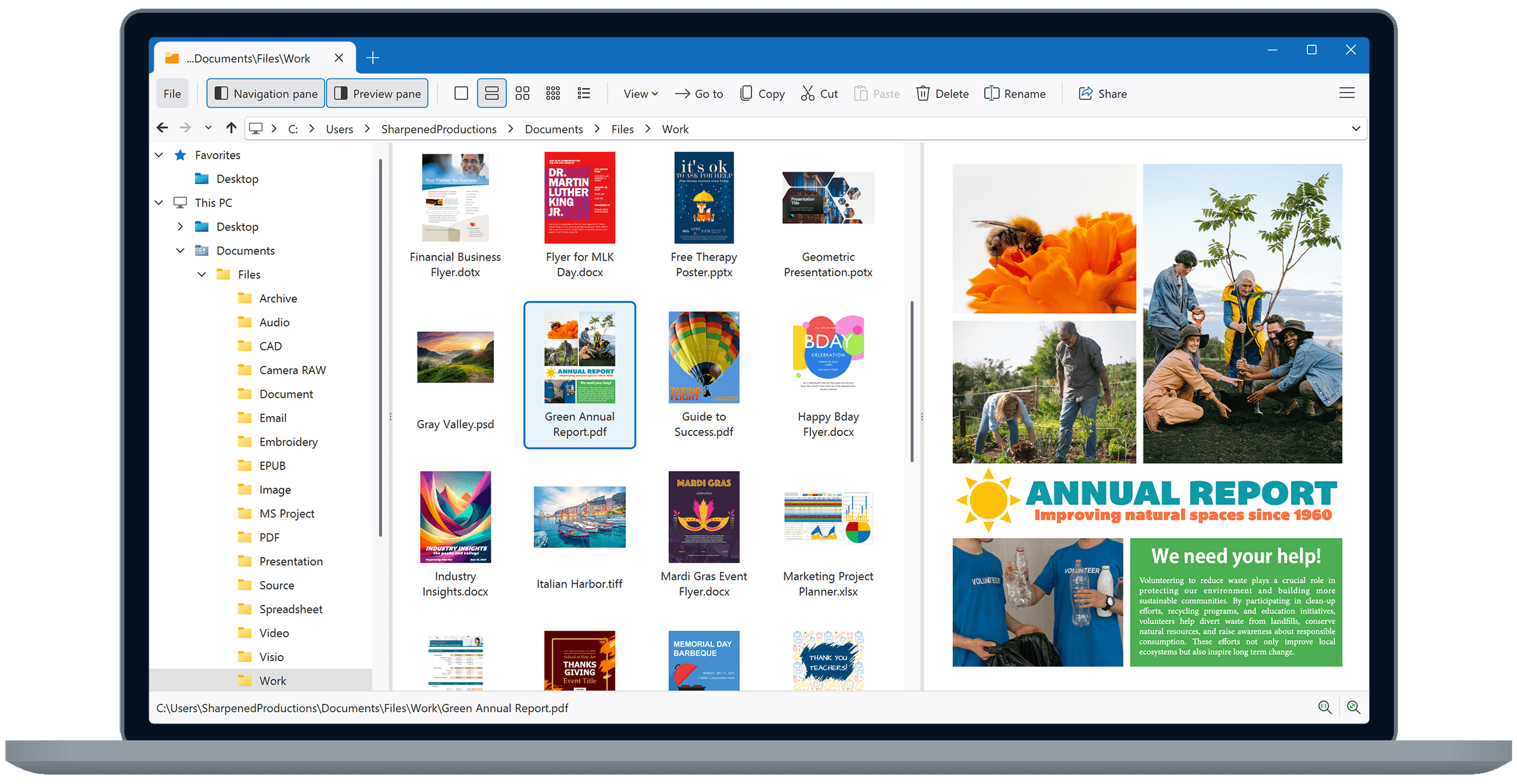
File Viewer Plus features a straightforward layout. Menus and options are logically grouped. Users can find tools quickly without confusion.
The main window displays file contents clearly. Tabs and toolbars help switch between files and functions smoothly. This reduces time spent searching through features.
Customization Options
Users can adjust the interface to fit their needs. Toolbar buttons can be added or removed. This creates a personalized workspace.
Different view modes allow users to choose how files appear. They can switch between thumbnails, lists, or detailed views. This flexibility improves file handling efficiency.
Preview Functionality
Previewing files is fast and reliable. File Viewer Plus supports many file formats for preview. Users can see images, documents, and videos without opening separate programs.
The preview pane updates instantly when switching files. This saves time and makes reviewing multiple files easier. It also supports zooming and rotating images for better viewing.
Performance
File Viewer Plus delivers solid performance across various tasks. It handles everyday file viewing and editing smoothly. The software is designed to run efficiently on most Windows systems. Users benefit from quick access and reliable operation. Let’s explore how it performs in speed, file size handling, and stability.
Speed And Responsiveness
The program opens files quickly without long waits. Navigation between tabs and tools feels fluid. Commands execute almost instantly, enhancing productivity. No noticeable lag appears during common tasks. This responsiveness helps users complete work faster.
Handling Large Files
Large files open with minimal delay. The software manages high-resolution images and lengthy documents well. It processes complex spreadsheets without slowing down. Users can view and edit big files without crashes or freezes. This capability suits professionals working with heavy data.
Stability And Reliability
File Viewer Plus remains stable over extended use. Crashes and errors are rare during testing. The program recovers gracefully from unexpected issues. Autosave features protect work from accidental loss. This reliability builds trust for daily file management tasks.
Editing Capabilities
File Viewer Plus offers a range of editing tools that help you modify different file types. It supports text documents, images, and spreadsheets. The editing features are straightforward and easy to use. These tools make it simple to adjust files without needing separate software.
Text And Document Editing
You can edit text files and common document formats with ease. The interface allows quick changes to text, fonts, and formatting. Basic tools like cut, copy, paste, and undo are included. It supports popular file types such as DOCX, TXT, and PDF. Simple edits like adding or removing text are smooth and fast.
Image Manipulation
File Viewer Plus lets you change images in various ways. You can crop, rotate, and resize pictures quickly. It supports common image formats like JPG, PNG, and BMP. The program also allows adjustments to brightness and contrast. This makes it easy to enhance photos without extra software.
Spreadsheet Features
The software includes basic spreadsheet editing tools. You can open and edit XLSX and CSV files. It supports editing cells, changing values, and modifying formulas. Users can also add or delete rows and columns. These features help manage data without using a full spreadsheet program.
File Conversion
File Viewer Plus offers a robust file conversion feature that simplifies changing files from one format to another. This function supports a wide range of file types, making it a versatile tool for everyday use. Users can convert documents, images, audio, and video files with ease. The interface is user-friendly, allowing quick access to conversion options without confusion.
Converting files with this software helps save time and avoids the need for multiple apps. It ensures the output files maintain quality and compatibility with other programs. Whether for work or personal use, the file conversion feature adds great value to File Viewer Plus.
Supported Output Formats
File Viewer Plus supports numerous output formats across various file types. Document conversions include popular formats like DOCX, PDF, TXT, and RTF. For images, common formats such as JPEG, PNG, BMP, and GIF are available. Audio and video files can be converted into MP3, WAV, MP4, and AVI formats. This wide format support covers most user needs for file conversion.
Pdf To Text Conversion
The program converts PDF files to editable text quickly and accurately. This feature extracts text from PDFs while preserving the original layout as much as possible. It allows users to edit or reuse text from scanned documents or reports. The conversion process is straightforward, requiring just a few clicks to complete. This tool is especially useful for those who work with PDF files regularly.
Batch Conversion Process
File Viewer Plus allows batch conversion, saving time on multiple files. Users can select many files and convert them all at once. The software processes each file quickly, maintaining consistent output quality. Batch conversion supports documents, images, and other file types. This feature is ideal for users needing to convert large numbers of files efficiently.
Pricing And Licensing
Understanding the pricing and licensing of File Viewer Plus helps you decide if it fits your needs. The software offers flexible options for different users. You can try the tool before buying to explore its features. Plans vary to accommodate casual users and professionals alike.
Free Trial Availability
File Viewer Plus provides a free trial for new users. This trial lets you test most features without paying. You can open and view many file types during the trial. It lasts for a limited time, giving a good chance to explore the software. No credit card is required to start the free trial.
Subscription Plans
The software offers a one-time purchase option and subscription plans. The one-time license lets you use the software forever on one PC. Subscription plans provide ongoing updates and support. You can choose monthly or yearly subscriptions based on your needs. Prices are competitive compared to similar file viewers.
Value For Money
File Viewer Plus offers solid value for its price. It supports over 300 file types, reducing the need for multiple apps. The software combines viewing, editing, and converting features in one package. Regular updates improve compatibility and add new file formats. Users get reliable support and a user-friendly interface with every purchase.
User Experience
File Viewer Plus offers a user experience designed to be simple and effective. It supports many file types in one place, reducing the need for multiple apps. The interface is clear and easy to navigate, making file viewing and editing straightforward. Users benefit from quick access to powerful features without confusion.
Ease Of Use
The software has a clean layout that users find friendly. Opening files is fast, and the drag-and-drop feature works smoothly. Tools are easy to find and use, even for beginners. The app does not overwhelm users with too many options at once. It guides users through file conversion and editing steps clearly.
Customer Support
Customer support responds quickly and helps solve problems well. The team provides clear instructions and useful tips. Support is available through email and an online help center. Tutorials and FAQs cover common questions and issues. Users feel supported when they need assistance.
User Feedback And Ratings
Many users rate File Viewer Plus highly for ease and reliability. Reviews praise its ability to open rare and common file types. Users like the fast performance and clean interface. Some note the value of editing features included. Overall, feedback shows strong satisfaction with the product.

Credit: www.g2.com
Safety And Security
Safety and security are key concerns when using any software that handles files. File Viewer Plus takes these seriously. It protects your data and keeps your computer safe. Users can open and edit files without worry. The software includes strong safeguards to prevent risks.
Data Privacy Measures
File Viewer Plus respects your privacy. It does not collect or share your personal data. Files you open stay on your device only. No cloud upload happens without your permission. The software uses local processing to keep data secure. You control what files you open and save. This approach limits exposure to online threats.
Virus And Malware Protection
The program scans files before opening them. It detects harmful content and blocks it instantly. This helps prevent viruses from entering your system. File Viewer Plus works with your antivirus software smoothly. It adds an extra layer of defense. The software updates regularly to handle new threats. This keeps your computer safer over time.
Comparison With Alternatives
Comparing File Viewer Plus with other file viewers helps identify its unique strengths. Many alternatives offer basic viewing features, but File Viewer Plus combines viewing, editing, and converting in one tool. Understanding these differences aids in selecting the right software for your needs.
Key Differences
File Viewer Plus supports over 400 file types, more than most competitors. It allows users to edit documents, images, and spreadsheets. Many alternatives focus only on viewing, lacking editing capabilities. File Viewer Plus also includes batch conversion features. Its interface is user-friendly and designed for quick access. Some alternatives may have better specialized tools but less file format support.
Pros And Cons
Pros of File Viewer Plus include wide file type support and editing tools. It offers simple batch conversions and metadata viewing. The software is easy to navigate, even for beginners. On the downside, it can be slower with very large files. Some advanced editing features are limited compared to specialized programs. The price may be higher than free viewers but reflects its added functions.
Best Use Cases
File Viewer Plus works well for users handling multiple file types daily. It suits professionals who need quick edits without switching software. People managing documents, images, and spreadsheets benefit from its versatility. It is helpful for converting files to different formats easily. For users needing deep editing or design tools, specialized software is better. File Viewer Plus shines in simple, all-in-one file management tasks.
Installation And Removal
Installing and removing File Viewer Plus is straightforward. The process is designed for users of all experience levels. You can get started with just a few clicks. Uninstallation is just as simple, helping you manage your software without hassle.
Download Process
Visit the official File Viewer Plus website or Microsoft Store. Select the download button to start the process. The file size is moderate, so it won’t take long. Once downloaded, open the setup file to begin installation. Follow the on-screen instructions to complete it. Choose your preferences for language and installation folder. Wait a few moments as the program installs fully. Finally, launch File Viewer Plus to start using it right away.
Uninstallation Steps
Open the Start menu and click on Settings. Navigate to the Apps section to see installed programs. Scroll down and find File Viewer Plus in the list. Click on it and select the Uninstall option. Confirm your choice to remove the software from your PC. The system will delete all program files automatically. Restart your computer if prompted to complete the removal. This clears space and keeps your system clean.

Credit: todaytesting.com
Conclusion
File Viewer Plus offers a simple way to open many file types. It supports editing and converting files with ease. The user interface is clear and easy to navigate. This tool saves time by handling different files in one place.
For anyone needing a versatile file viewer, it is a solid choice. Try the free trial to see if it fits your needs. Overall, it makes file management less stressful and more efficient.