Tenorshare Review: Ultimate Guide to Features & Benefits

If you’ve ever faced a frozen screen, a boot loop, or lost important data on your iPhone or Android device, you know how frustrating it can be. That’s where Tenorshare steps in, promising easy fixes for common device problems.
But does it really deliver on its promises? In this Tenorshare review, you’ll get a clear look at what this software offers, how well it works, and whether it’s worth your time and money. From system repair tools to data recovery features, we’ll break down the pros, cons, and user experiences so you can decide if Tenorshare is the right choice for your tech troubles.
Keep reading to find out everything you need before making your next move.
Tenorshare Product Lineup
Tenorshare offers a range of features designed to help users fix common device problems and recover lost data. These features focus on system repair, data recovery, device support, and ease of use. Understanding these key aspects can help you decide if Tenorshare fits your needs.
System Repair Capabilities
Tenorshare can fix many system issues on iOS and Android devices. It repairs problems like boot loops, frozen screens, and stuck recovery modes. The software offers a standard repair mode that does not erase your data. For more serious problems, it provides a deep repair option. This helps restore devices without needing a factory reset.
Data Recovery Options
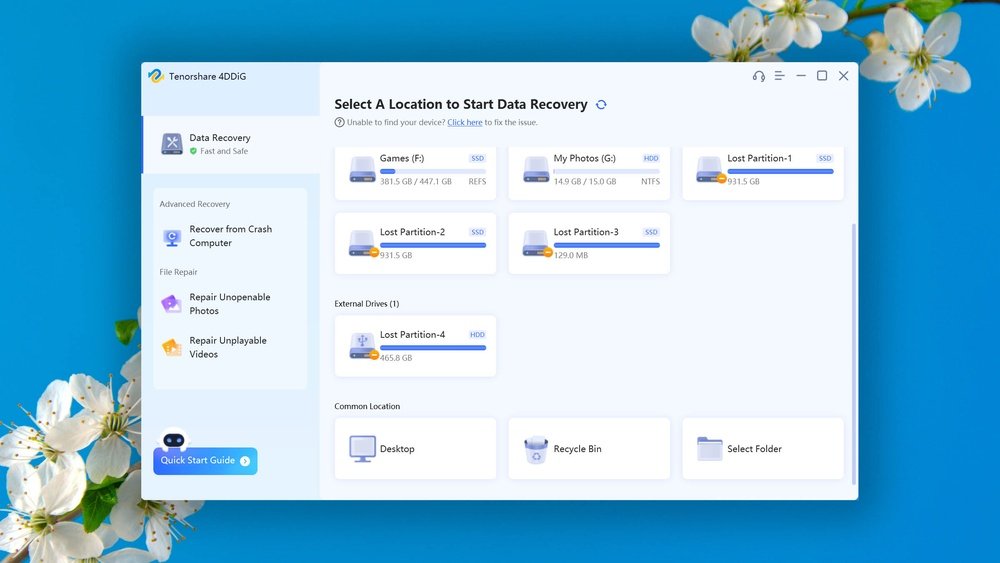
The data recovery tools recover deleted photos, messages, contacts, and videos. Tenorshare supports recovery from phones, tablets, and even SD cards. It scans devices quickly and shows a preview of recoverable files. Users can select which files to restore, saving time and storage space. The software works with different data loss scenarios, including accidental deletion and system crashes.
Device Compatibility
Tenorshare supports a wide range of devices and operating systems. It works with most iPhones, iPads, and Android smartphones. The software supports the latest iOS and Android versions. It also supports older devices, making it useful for many users. Compatibility extends to various file types and storage formats.
User Interface And Ease Of Use
The interface is simple and easy to navigate. Step-by-step guides help users complete tasks without confusion. The software uses clear language and large buttons for easy interaction. Even beginners find the tools easy to use. The clean design reduces the chance of errors during repair or recovery.

Credit: thebusinessdive.com
Key Features
Understanding the pricing and subscription details of Tenorshare software helps users make informed decisions. This section breaks down the available license options, compares costs, and explains subscription renewal policies. Clear knowledge of these aspects avoids surprises and ensures the right purchase choice.
License Options
Tenorshare offers several license plans. Users can select between monthly, annual, or lifetime licenses. Each plan covers different features and device limits. For example, a monthly license allows use for 30 days, while a lifetime license provides permanent access. Licenses are available for single or multiple devices, depending on user needs.
Cost Comparison
Monthly licenses usually cost more per month compared to annual plans. Annual licenses offer savings for longer use. Lifetime licenses have a higher upfront cost but no recurring fees. Compared to similar software, Tenorshare’s prices are on the higher side. Users should weigh the price against needed features and support.
Subscription Renewal Policies
Subscriptions automatically renew at the end of each billing cycle. Tenorshare sends reminders before renewal, but users must watch their email closely. Cancellation must occur before renewal to avoid charges. Refunds are limited and often require contacting customer service. Understanding these rules prevents unwanted payments.
Performance And Reliability
Understanding the pros and cons of Tenorshare helps decide if it fits your needs. This section breaks down its strengths and weaknesses clearly. It highlights key points for easy comparison.
Advantages For Beginners
Tenorshare is very easy for beginners. The software uses step-by-step guides. These wizards help users complete tasks without confusion. The interface is clean and simple to navigate. No advanced tech skills are needed to operate it. This makes Tenorshare a solid choice for first-time users.
Effectiveness Of Tools
The tools in Tenorshare work well for basic repairs and recovery. It can fix frozen screens and boot loops reliably. Many users report success restoring devices without data loss. The system repair feature supports both iOS and Android devices. It performs as advertised in most standard cases. This effectiveness builds trust in the software’s core functions.
Limitations And Drawbacks
Tenorshare’s pricing is quite high for short-term use. Users often mention aggressive sales tactics that can be annoying. Some complain about automatic subscription renewals without clear consent. Refunds appear difficult to obtain once purchased. These issues may frustrate those seeking affordable, straightforward service. Also, some advanced problems might need professional help beyond the software.

Credit: ratings.7datarecovery.com

Credit: thebusinessdive.com
Conclusion
Tenorshare offers useful tools for iOS and Android users. It handles common device issues like system repair and data recovery well. The interface is easy to use, even for beginners. Pricing can be high, and some users find refund processes tricky.
Pop-up ads and automatic renewals may annoy some customers. Overall, it works for basic tasks but may not suit every budget or need. Consider your specific problem before choosing Tenorshare. Free alternatives might be enough for simple fixes.