Moneyspire Review: Unveiling the Ultimate Personal Finance Tool

Looking for a personal finance tool that puts you in control without locking you into monthly fees? Moneyspire might be exactly what you need.
This software promises a straightforward way to track your accounts, manage budgets, and keep your financial data private—all from your desktop. But how well does it really work? In this Moneyspire review, you’ll discover the features that set it apart, the costs involved, and whether it fits your unique money management style.
Keep reading to find out if Moneyspire can help simplify your finances and give you peace of mind.

Credit: www.youtube.com
Moneyspire Basics
Moneyspire is simple personal finance software designed for desktop use. It helps users manage budgets, track accounts, and control spending.
The software aims to provide core financial tools without monthly fees. It suits those who want straightforward money management with privacy.
What Moneyspire Does
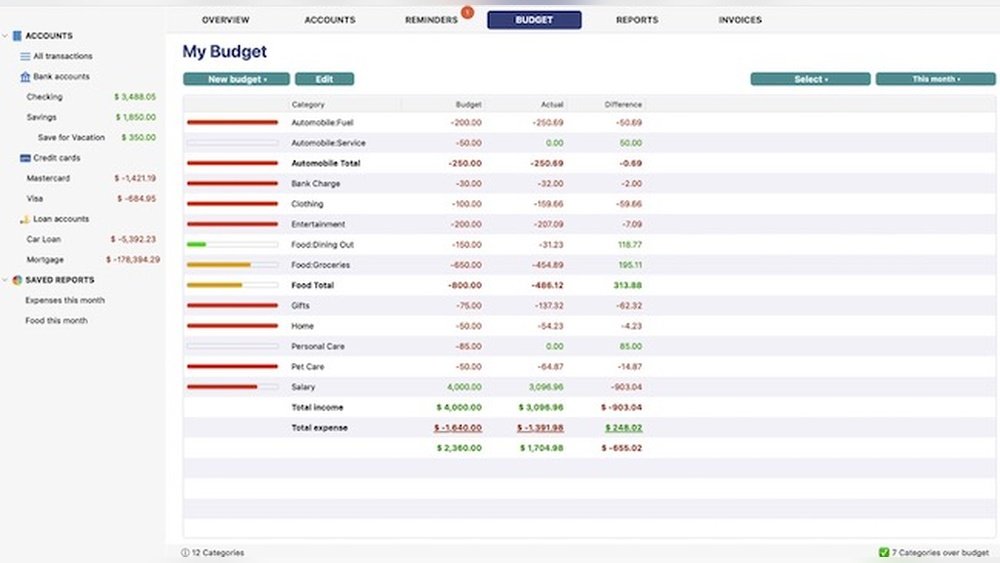
Moneyspire tracks bank accounts, credit cards, loans, and investments in one place. It allows users to create budgets and set spending limits by category. The software sends bill reminders to avoid late fees. Users can forecast future balances to plan expenses better. It supports importing data from other finance programs like Quicken. These features help users stay organized and control their finances easily.
Supported Platforms
Moneyspire works on Windows, Mac, Linux, and Chromebook. A single license covers multiple computers. This cross-platform support helps users access their data on different devices. The desktop focus means it runs smoothly without needing constant internet access. Mobile access is limited, so the main experience is on a computer.
Local Data Storage And Privacy
Moneyspire stores all data locally on your computer. This means your financial information is not saved in the cloud by default. Local storage reduces the risk of data breaches and protects your privacy. Users can choose if they want to sync data via optional cloud services. This design appeals to those concerned about online security and privacy.

Credit: www.youtube.com
Core Features
Privacy and security are vital when managing your finances. Moneyspire prioritizes these aspects by giving users control over their data. It balances convenience with strong protection measures. This focus ensures your financial information stays safe and private.
Local Data Storage Benefits
Moneyspire stores all your financial data directly on your computer. This local storage means your information is not saved on external servers. You avoid risks linked to cloud data breaches or unauthorized access. Local storage also allows you to control backups and security settings. Your data remains accessible even without an internet connection.
Bank Sync And Updates
Moneyspire supports bank synchronization to keep your accounts up to date. It connects securely to your bank to download transactions. The software uses encryption to protect your login details during sync. Updates for bank connections require renewal after the first year. This system balances regular updates with maintaining user control and privacy.
Pricing And Licensing
Moneyspire suits a wide range of users who want straightforward financial management. It works well for individuals, families, and small business owners. Users who prefer desktop software over cloud-only services will find it especially helpful. Its non-subscription model appeals to those avoiding monthly fees. Privacy-conscious users benefit from local data storage. Moneyspire covers basic to moderately complex money tasks.
Best Features For Different Users
For individuals, Moneyspire offers easy budget tracking and bill reminders. Families can share the software across devices using one license. Small business owners appreciate account tracking and invoice management. People managing multiple currencies gain from built-in support. Those switching from other tools find helpful data import options. Users who want clear reports get simple financial summaries. It fits users who value privacy and offline access.
Workflow Fit And Recommendations
Moneyspire fits users who work mainly on desktops. It suits those who prefer manual data entry with some automation. Users who want control over their data without cloud dependency benefit most. It works well for steady financial routines, like monthly budgeting and bill payments. For users needing advanced investment tools, Moneyspire may feel basic. It is ideal for people wanting a one-time purchase instead of subscriptions. Users should match their financial needs with these strengths for best results.

Credit: machow2.com
Conclusion
Moneyspire offers a solid choice for managing personal finances offline. It supports multiple platforms with a one-time purchase, avoiding ongoing fees. The software suits users who prefer local data storage and basic budgeting tools. While its mobile app and investment features have limits, it covers essential needs well.
Consider your priorities before choosing Moneyspire to ensure it fits your financial habits. This review highlights key points to help you make a clear, informed decision.