Build Websites from Notion Airtable Or Google Sheets: Easy Steps

Imagine turning your simple Notion pages, Airtable bases, or Google Sheets into a fully functional website without writing a single line of code. Sounds exciting, right?
If you’ve ever wished your data could do more—become a sleek portfolio, a dynamic blog, or even an online store—this is exactly what you need. You’ll discover easy, powerful ways to transform your everyday tools into stunning websites that work for you.
Ready to unlock the hidden potential of your data? Let’s dive in.

Credit: www.softr.io
Choosing Your Data Source
Choosing the right data source is key to building a website that works well. The data you use shapes your site’s content and how easy it is to update. Notion, Airtable, and Google Sheets each offer unique features. Picking one depends on your needs, like ease of use, flexibility, and the type of content you want.
Each option has strengths. Understanding these helps you pick the best fit for your project.
Notion As A Website Backend
Notion is a popular tool for notes and databases. It lets you organize content in pages and tables. You can use it as a backend to manage your website data easily.
Its simple interface helps non-technical users update content. Changes in Notion reflect quickly on your site. This makes it great for blogs, portfolios, and small business sites.
Using Airtable For Web Content
Airtable combines spreadsheets with a database. It offers more power and customization than simple tables. You can link records, add attachments, and create complex views.
This makes Airtable ideal for sites needing rich data structures. Examples include product catalogs, event calendars, and directories. Its API supports dynamic updates and automation.
Google Sheets For Dynamic Sites
Google Sheets is a well-known spreadsheet tool. It is easy to use and widely available. Many people already know how to work with it.
Using Google Sheets as a data source allows fast content updates. It suits sites with frequently changing data, like price lists or schedules. Its integration with other Google services adds extra value.
Preparing Your Data
Preparing your data is the first step in building a website using Notion, Airtable, or Google Sheets. Clean, organized data makes the whole process easier. It helps you avoid errors and ensures your website displays information correctly.
Each platform has its own way to manage data. Understanding how to prepare your data in each tool saves time. It also improves the final look of your site.
Organizing Data In Notion
Notion lets you create pages and databases. Use tables to store your data. Keep each piece of information in its own column. Name columns clearly, like “Title,” “Description,” or “Date.”
Use tags and categories to group similar items. Avoid empty rows or columns. This helps the website pull data without mistakes. Double-check that all entries are consistent and complete.
Structuring Airtable Bases
Airtable works like a spreadsheet with extra features. Create bases for different topics or projects. Inside bases, build tables with clear headers. Each row should represent one item or record.
Use linked records to connect related data. Choose the right field type, such as text, number, or date. This keeps the data accurate. Keep the base simple and easy to read.
Formatting Google Sheets Properly
Google Sheets is a familiar tool for many. Start by labeling each column with a clear name. Avoid merged cells, as they can cause errors. Keep your data in a simple table format.
Use separate sheets for different data sets if needed. Make sure all dates and numbers follow the same format. Remove blank rows and columns to keep the sheet tidy. This makes it easier to import into website builders.
Selecting Website Builders
Selecting the right website builder is key to create a smooth and effective site. Each builder offers unique features that match different data sources like Notion, Airtable, or Google Sheets. Choose a tool that fits your needs and skills. This ensures your website works well and looks good.
Tools For Notion-based Sites
Notion is popular for note-taking and project management. Several website builders connect directly with Notion. These tools turn your Notion pages into live websites fast. They keep your site updated when you edit Notion. Examples include Super and Potion. These builders make simple site setup easy. They support custom domains and simple design options.
Platforms Supporting Airtable
Airtable blends spreadsheets and databases. It stores data in an organized way. Website builders like Softr and Pory work well with Airtable. They let you create dynamic sites using Airtable data. You can build member pages, catalogs, or directories. These platforms sync data automatically. No need to update manually after the first setup.
Integrations With Google Sheets
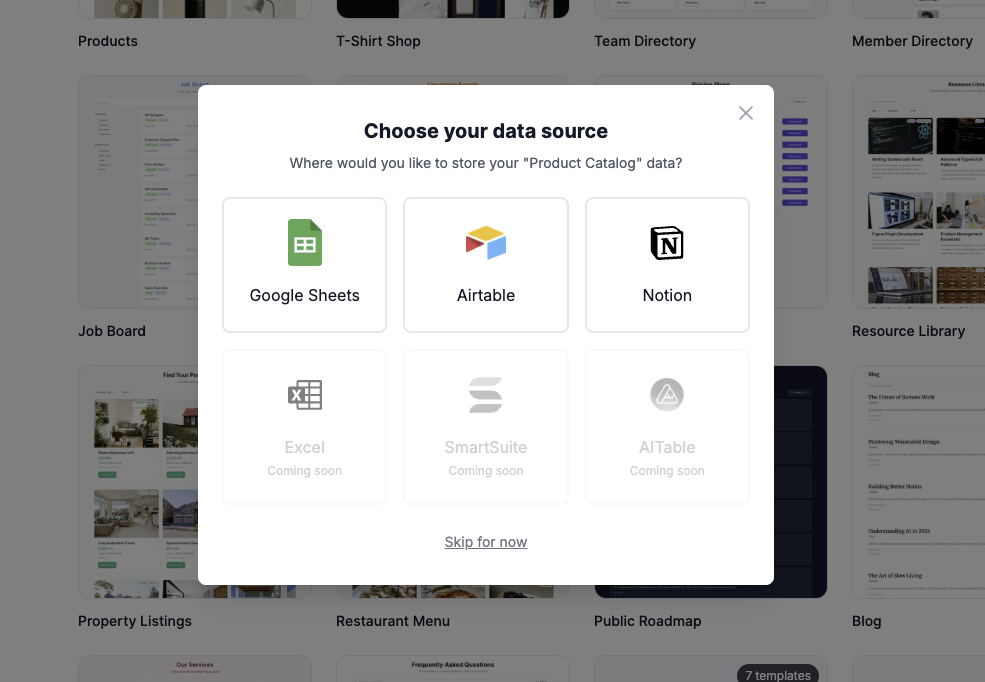
Google Sheets is widely used for data management. Many builders connect with Google Sheets through APIs or plugins. Tools like Sheet2Site and AppSheet convert sheet data into websites. These integrations allow easy updates on your site by changing the sheet. They suit users who prefer spreadsheet control. These builders often support forms and filters.
Credit: appsumo.com
Connecting Data To Website
Connecting data to your website lets you show live information easily. It makes your site dynamic and up to date without manual changes. You can use tools like Notion, Airtable, or Google Sheets as your data source. These platforms store your content in tables or databases. Linking them to your website helps display content like lists, prices, or schedules automatically.
Api Connections And Plugins
APIs let your website talk to data sources directly. They send and receive data in real time. Many tools offer APIs to fetch data from your Notion, Airtable, or Google Sheets. Plugins can simplify this process by connecting APIs without coding. They often come with easy setup and customization options. Using APIs or plugins keeps your website content fresh and accurate.
Embedding Data With Widgets
Widgets are small blocks of code you place on your website. They show data like tables, charts, or calendars from your source apps. Notion, Airtable, and Google Sheets support widgets that update automatically. Embedding widgets is simple. Just copy the provided code and paste it into your site’s HTML. This method requires no coding skills and updates data live.
Using No-code Integrations
No-code tools connect your data sources to websites without programming. Platforms like Zapier or Integromat automate data syncing. They move data from Notion, Airtable, or Google Sheets to your website builder. These integrations save time and reduce errors. You can set up triggers and actions with simple drag-and-drop interfaces. This approach fits users who want quick, code-free solutions.
Designing Your Website
Designing your website is a crucial step when building from Notion, Airtable, or Google Sheets. It shapes how visitors see your content. Good design makes your site easy to use and attractive.
Focus on clear visuals and simple navigation. Your design should help visitors find what they need fast. Let’s explore how to choose templates, customize layouts, and add interactive features.
Choosing Templates And Themes
Select templates that match your website’s purpose. Templates save time and give your site a professional look. Pick themes with colors and fonts that suit your brand.
Look for templates that work well with data from Notion, Airtable, or Google Sheets. Responsive designs ensure your site looks good on phones and tablets.
Customizing Layouts
Adjust the layout to fit your content and style. Move sections, resize images, and change text placement. A clean layout helps visitors focus on key information.
Keep spacing consistent and avoid clutter. Use headings and bullet points to break text into easy chunks. Custom layouts make your site unique and user-friendly.
Adding Interactive Elements
Add buttons, forms, and links to engage visitors. Interactive elements guide users and collect feedback. Use simple tools to connect your website with your data sources.
Try features like search bars or filters to help users find data quickly. Interactive parts make your site more dynamic and useful.
Publishing And Maintenance
Publishing and maintaining a website built from Notion, Airtable, or Google Sheets is simple and efficient. It involves choosing the right hosting, updating content quickly, and keeping track of site performance. These steps ensure your website stays live, fresh, and useful for visitors.
Hosting Options
You can host your site on many platforms. Some tools offer built-in hosting with just a few clicks. Alternatively, you can use popular web hosts like Netlify, Vercel, or GitHub Pages. These services support static sites generated from your data. They provide fast loading times and reliable uptime. Choose a host that fits your budget and technical skills.
Updating Content Seamlessly
Updating content is easy with data-driven sites. Changes made in Notion, Airtable, or Google Sheets reflect on your website automatically or after a quick rebuild. This saves time and avoids manual editing. You can keep your information current without touching the site code. This process is ideal for blogs, product lists, or event pages.
Monitoring Website Performance
Tracking your website’s performance helps maintain quality. Use tools like Google Analytics or Simple Analytics to see visitor numbers and behavior. Monitor page speed with tools such as Google PageSpeed Insights. Fix issues like slow loading or broken links quickly. Regular checks keep your site user-friendly and effective.
Troubleshooting Common Issues
Troubleshooting is key to keeping your website running smoothly. Using Notion, Airtable, or Google Sheets to build websites can bring some challenges. These issues often relate to data syncing, display errors, or slow load times. Fixing these problems quickly helps maintain a good user experience.
Fixing Data Sync Problems
Data sync issues happen when changes in your source file don’t show on the website. Check your connection settings first. Make sure your API keys or integration tokens are correct. Refresh or reconnect the data source to force an update. Clear your browser cache to avoid loading old data. Confirm that your data format matches what the website expects.
Resolving Display Errors
Display errors can make your site look broken or messy. Inspect the web page for missing images or text. Check that your data fields are correctly mapped in the website builder. Make sure your table or sheet has no empty rows or columns causing layout issues. Adjust the design settings to fit your content properly. Use a different browser to see if the problem persists.
Improving Load Times
Slow websites drive visitors away. Compress images and files used on the site. Limit the amount of data pulled from Notion, Airtable, or Google Sheets at once. Use pagination or filters to reduce load size. Choose a reliable hosting service with fast servers. Test your website speed with online tools and apply their recommendations.
Credit: www.lapa.ninja
Conclusion
Building websites using Notion, Airtable, or Google Sheets saves time and effort. These tools let you organize content easily and update it quickly. You do not need to learn complex coding skills. This approach suits simple projects and personal websites well.
Try these methods to create a website that fits your needs. Start small and improve as you learn. The process can be both fun and useful. Give it a shot and see how it works for you.